welcome

welcome to my destiny :)
I'm just a guy who is smile a lot
and the god give me a power
-------------------------------------------

You say anything Just tell me all your sweet lies

-------------------------------------------------

Time may change my life
But my heart remains the same to you
Time may change your heart
My love for you never changes

Showing posts with label symbian. Show all posts

Thursday, August 13, 2009

Default Themes of Nokia OS9 V3


Code:
http://www.mediafire.com/?bvb1e1jyexc


-------------------------------


Extract the numbered files which include the mbm,mif and skn files from RAR file and via mass storage drag and drop them to
E:\private\10207114\import\

Code:
http://www.mediafire.com/?vdgjjyyzy2n
I have them in sis files that can be open signed too

Code:
http://www.mediafire.com/?k11d4bcdzfn
-----------------------------------------------


Waveform & Stave

Nokia & Motion

Lights & Glass


Download link in RED below
Code:
http://www.mediafire.com/?ymybjtmyyv1
----------------------------------------------------


Extract from the zip file then via data transfer/mass storage Copy to E:\private\10207114\import\

Code:
http://www.mediafire.com/?vc9nwihmjcy
--------------------------------------------

*ORIGINAL* 5700 Xpressmusic Themes


Red
Code:
http://www.mediafire.com/?mzmjzne2tj2
Blue
Code:
http://www.mediafire.com/?whxgwgomgzz

--------------------------------------------
N78 Merlin Music Edition


Code:
http://www.mediafire.com/?nvzmomnznmn
----------------------------------------------------

ORIGINAL Nokia N79 Themes

Please be aware,these are partly compatible with our FP1 handsets as these are FP2 themes.

Number and text CANOTT be seen in the pop up box and there is a bit of lag to the themes.


Code:
http://www.mediafire.com/?ygxodf0g9tt
--------------------------------------------
Nokia 5320 'Soundwaves' Theme


No sis file here, you have to drag and drop the ENTIRE folder thats in the rar file at the NUMBERED link below into E/Private/import/10207114

Code:
http://www.mediafire.com/?00rep5jyy3w
-----------------------------------------------

*Original* N82 Themes


Just sign them on symbiansigned opensigned and install.

BTW if you install this on the OS9.1 system please try on the memory card first, I've heard that the original OS9.2 themes are not compatible with OS9.1


These themes work only on OS 9.2, they don't work on OS 9.1 like N73, N80, E65, 5500, E50 etc

Code:
http://www.mediafire.com/?ceizz9b2ykl
----------------------------------------------------
thanks http://www.dotsis.com/mobile_phone/showthread.php?t=150566&page=3

----------------------------------------------------

Monday, July 20, 2009

Wednesday, April 29, 2009

Overcloking your Symbian s60v3 smartphone If your mobile phone is very slow or not as fast as you expect, did you ever imagine overclocking your Symb

Overcloking your Symbian s60v3 smartphone

If your mobile phone is very slow or not as fast as you expect, did you ever imagine overclocking your Symbian S60v3 mobile phone like overlocking a computer and enjoy a higher speed when use your mobile phone?

How to overclock it


First, hack your mobile phone as you should have access to 'private' folder in C:\ on your phone in order to overclock your mobile phone.

Secondly, run Capoff and use X-plore only. Do not use ActiveFile as it could not open the file mentioned below because of some security issues.

Thirdly, navigate to C:\private\10202be9\20001079.txt, backup it first and then press 8 to edit it.

Finally, Find the line 0x00040007 as shown in the picture below, change the number behind int to any higher number you like and then save it. And keep in mind that you should not change it to any number too large.

Symbian s60v3 overclocking

Consider it carefully before you take any actions, I should not be held responsible for any damage to your mobile phone resulting from overclocking your cell phone.


Symbian s60v3 overclocking

thanks


http://www.eastmobiles.com/index.php?option=com_content&view=article&id=90:mobile-overclock&catid=25:symbian-os&Itemid=54

Monday, March 16, 2009

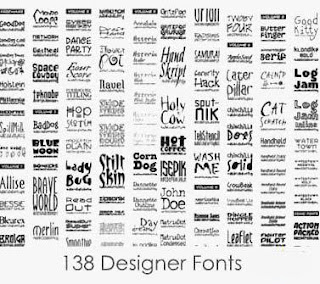
Complete Revised tutorial for changing your font + 138 HandPicked fonts AIO

So,here we go:

First step is you need to install THIS application on your mobile phone memory and it won't be in shown in your menu. Don't worry. This application is an unsigned application.
You will not find any application icon in your Menu but there will now be a folder in C:/data/Fonts.

Now to choose a font: Go to your PC and in Control Panel you will see the Fonts folder you can use any .ttf font, so right click on one you like (or use one i provided in THIS MEGAPACK) and copy the file to the desktop.

Now connect your phone to your PC via usb cable and move the .ttf file to your phone directory C:/data/Fonts, ONLY move one file in to the fonts folder. As shown in the second image above.

Disconnect your Phone from the PC and Restart your phone , the New font should be working straight away

Removing or Changing New font

You will probably want to try a few fonts and some are quite bad in small text size, or decide that you want to go back to the default nokia font.
It is possible to edit the .ini file to disable the new font but it is simpler to copy/move then delete the .ini file, then there is no need to editing tools.

1. All you need to do is copy the FontRouter.ini file in the fonts into another folder and delete the original .ini file. You cannot delete the font .ttf file as it is still in use.

2. RESTART your phone and the default font will be back, then delete the font.ttf file that was previously put in the fonts folder

3. If you want to try another font, put the Fontrouter.ini file BACK (that you just copied) in the Fonts folder with the new .ttf file and RESTART your phone again

4. I recommend putting the Font Samples folder i provided in C:/data/ so that you can copy the new fonts into the Fonts folder as you try them, it saves having to connect to you PC to get new fonts each time.

DOWNLOAD LINKS:

Though i've already mentioned links above,still,to summarise,here are the two files you would need:

FontRouter[1].LT.for.v9.Build20071109.opensigned.sis (the main application)

138 Handpicked fonts megapack

For your convenience,here is a screenshot of the fonts included in the pack:


Hope this post is useful to you.

LinkWithin

Related Posts Plugin for WordPress, Blogger...

Fm-radio-on-my-site

for you forever

Birthday - 13/12/1964 Death - 02/05/1997 bye bye hide

google analysis

ຊີວິດກໍ່ເໝືອນລະຄອນຕ່າງທີ່ບໍ່ສາດມາດຫຼິ້ນຄືນໃໝ່ໄດ້
ຊີວິດແມ່ນການສະແດງ ທີ່ບໍ່ມີຜູ້ກຳກັບ

online
Online Casino


website counter